

 HOME CONTACT SUPPORT SENSORYTEST.COM
 | |||
|
|
HOME CONTACT SUPPORT SENSORYTEST.COM |
|
Sensory testing professional's favorite virtual desktop. Say hello to SIMS Cloud Systems. From any device, any laptop, any iPad and even your cell phone. Log in from anywhere anytime. Inquire today. 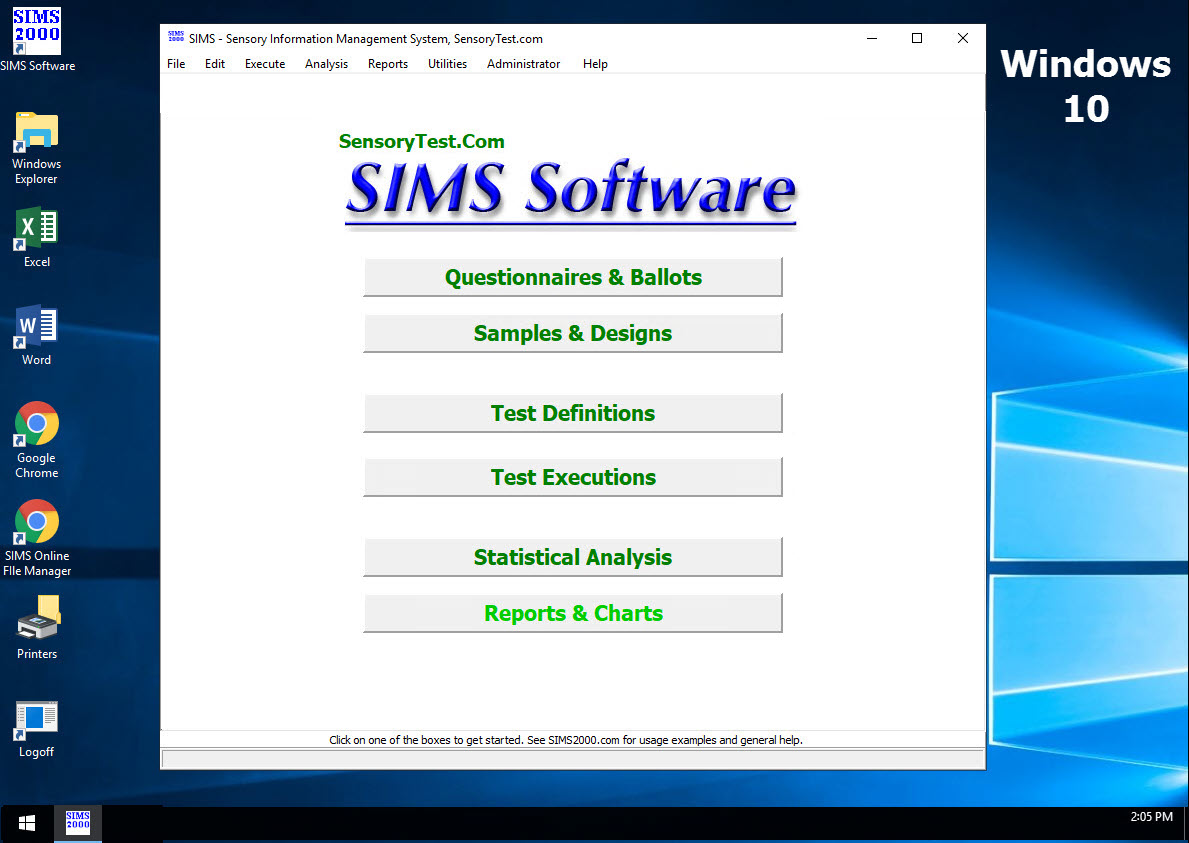
|
Mobile devices real test example Point your cell phone camera Easy for your respondents 
Link |
 VIEW REPORTS
 |
QUESTION CHOICES |
TEST CHOICES |
| DISCRIMINATION PAIRED COMPARISON EXAMPLES
PC Forced and Non-Forced Paired Comparison Tests are also commonly referred to as 2-AFC Alternative Forced Choice |
View More Reports View More Question Types Incomplete Block Paired Comparisons |
|
Paired Comparison Attribute Analysis SIMS Report 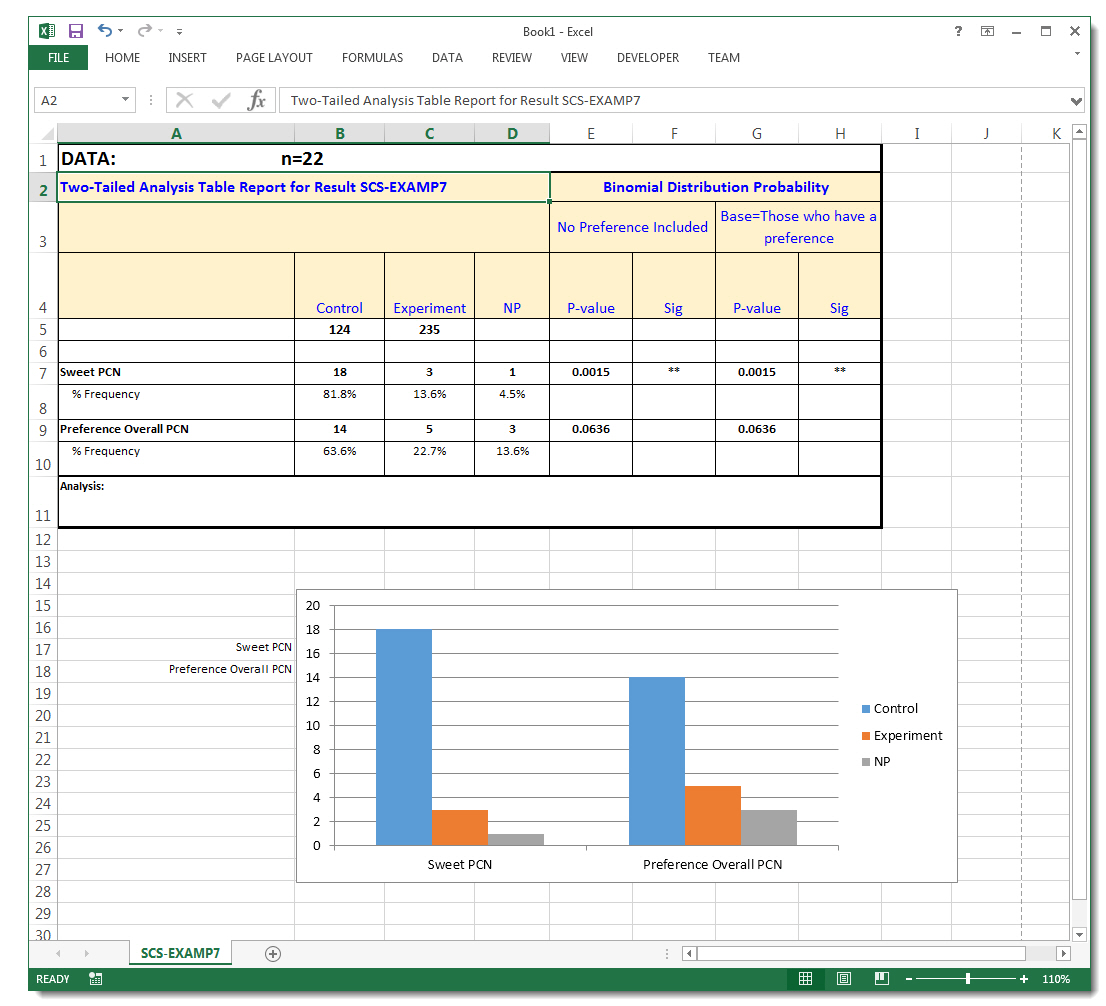
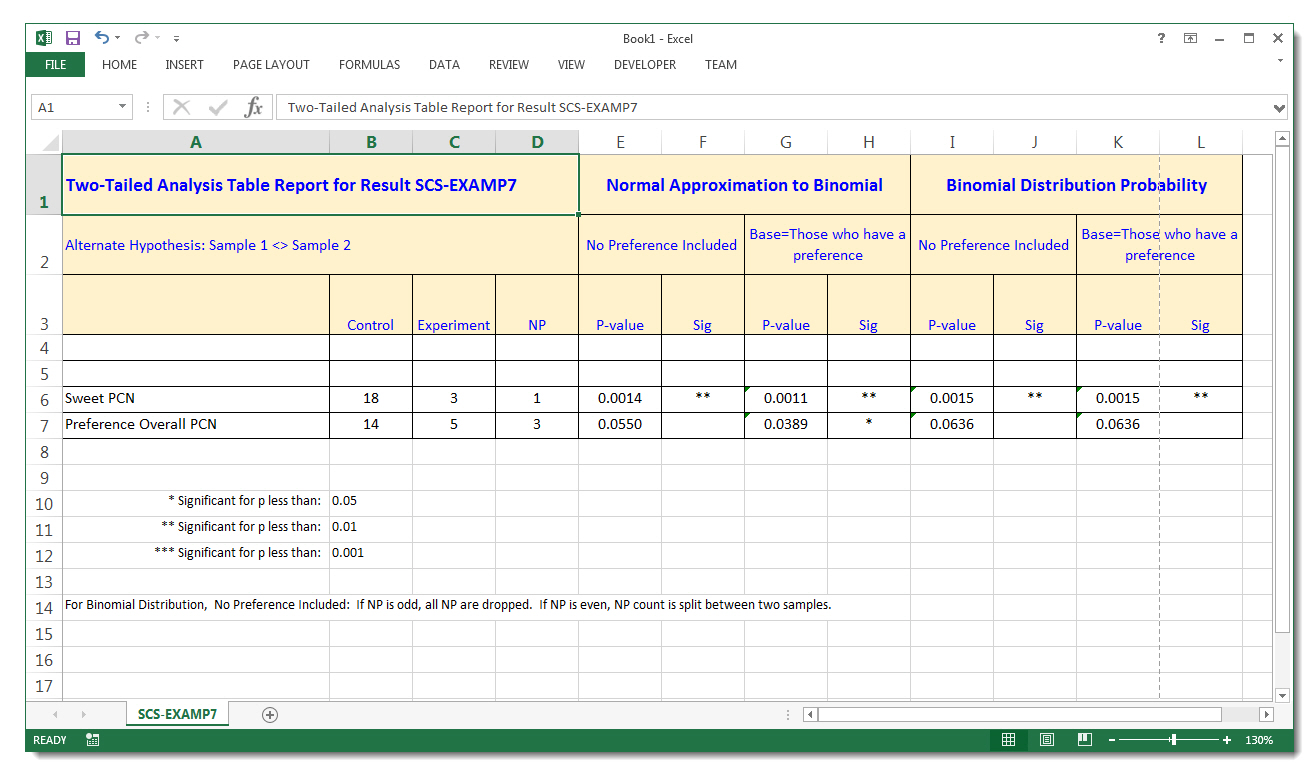
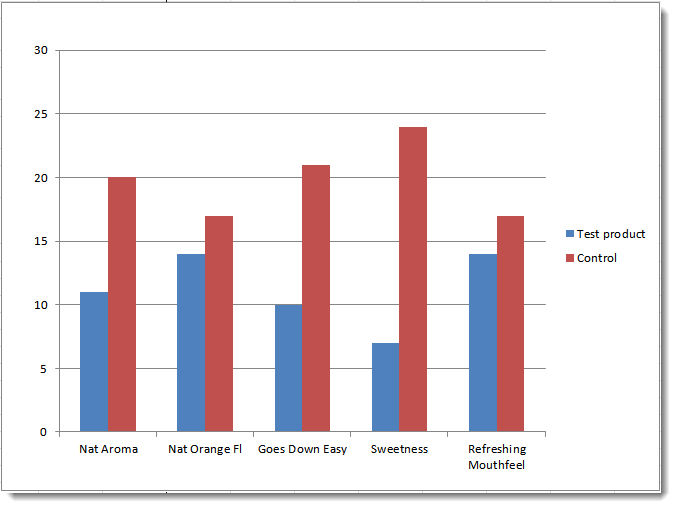
Report Setup 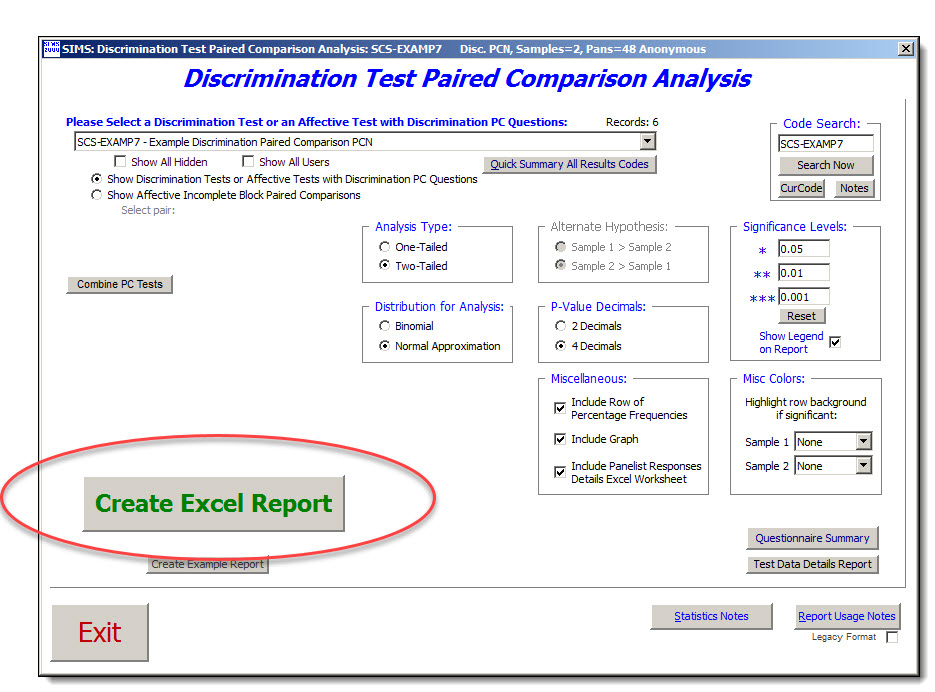
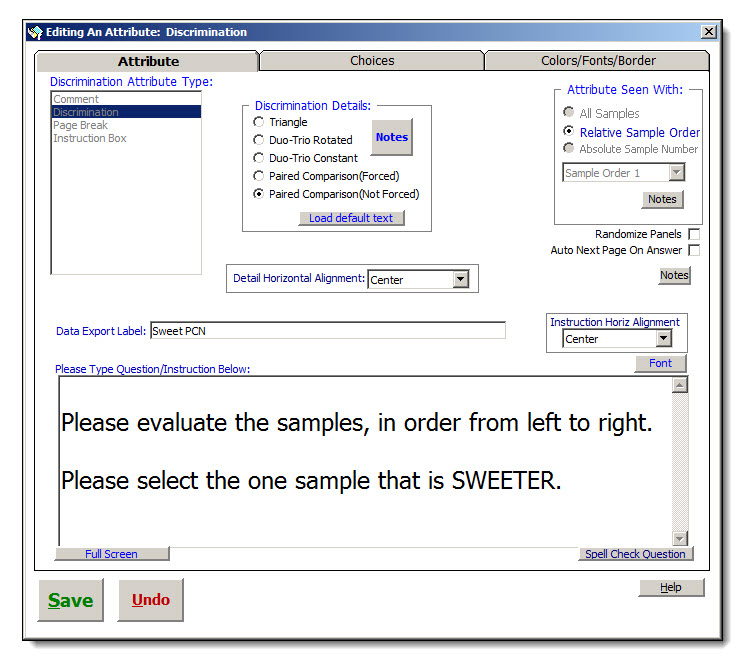
Ballot Example 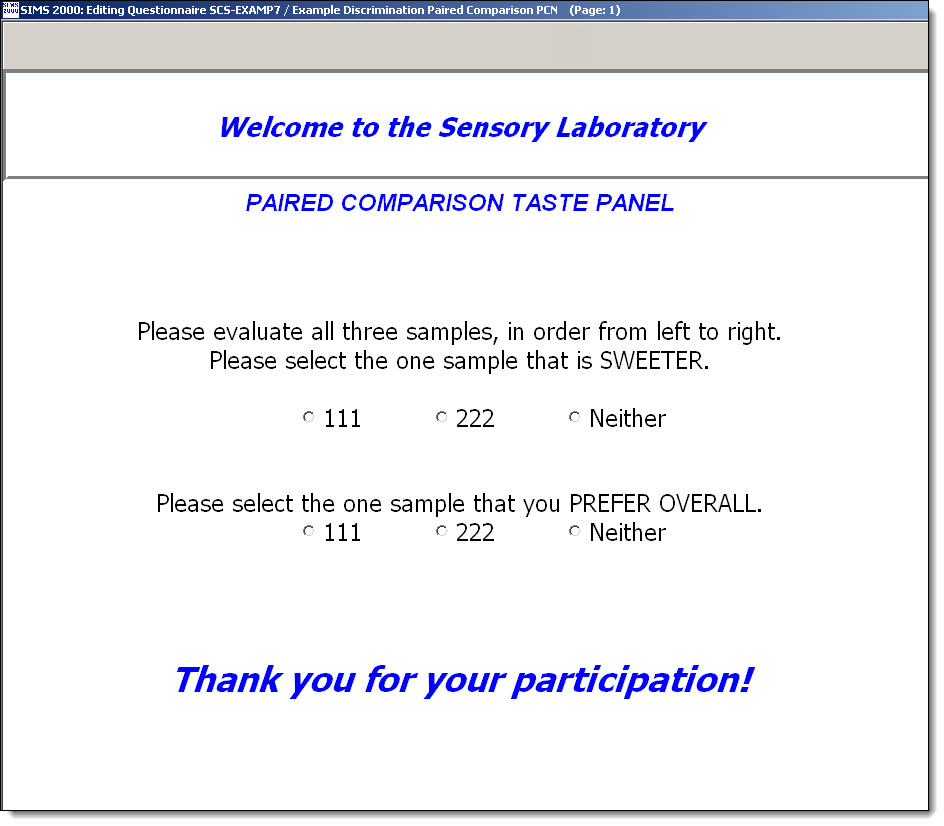
SIMS software express package file: SCS-EXAMP7.SIMS2000ExpressPackage.sql.ZIP More Paired Comparison Attribute Analysis SIMS Reports Automatic and advanced SAS, R, JMP, Excel statistics. 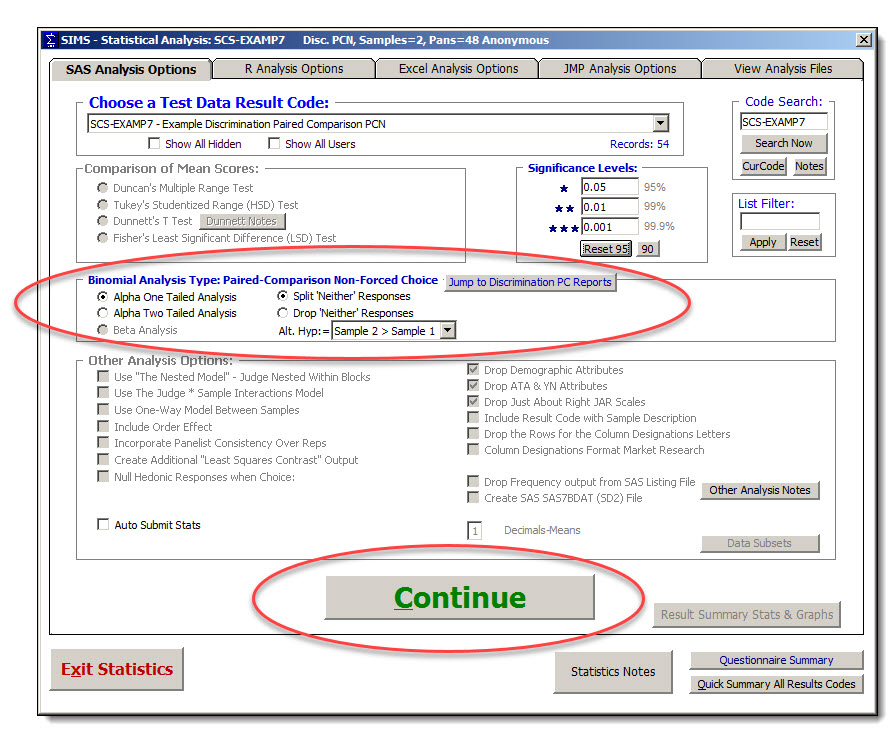
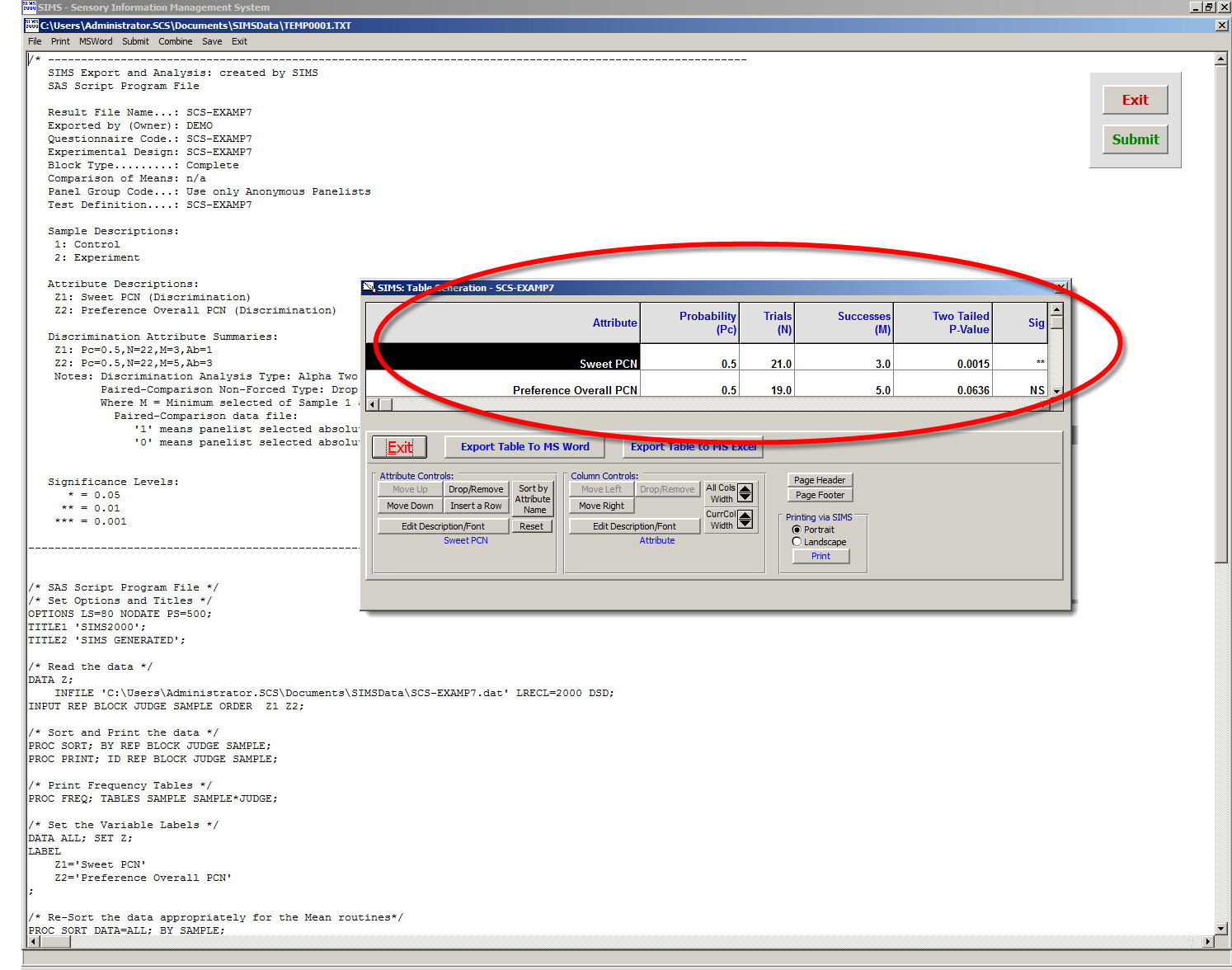
Export reports to Microsoft Word and Microsoft Excel. 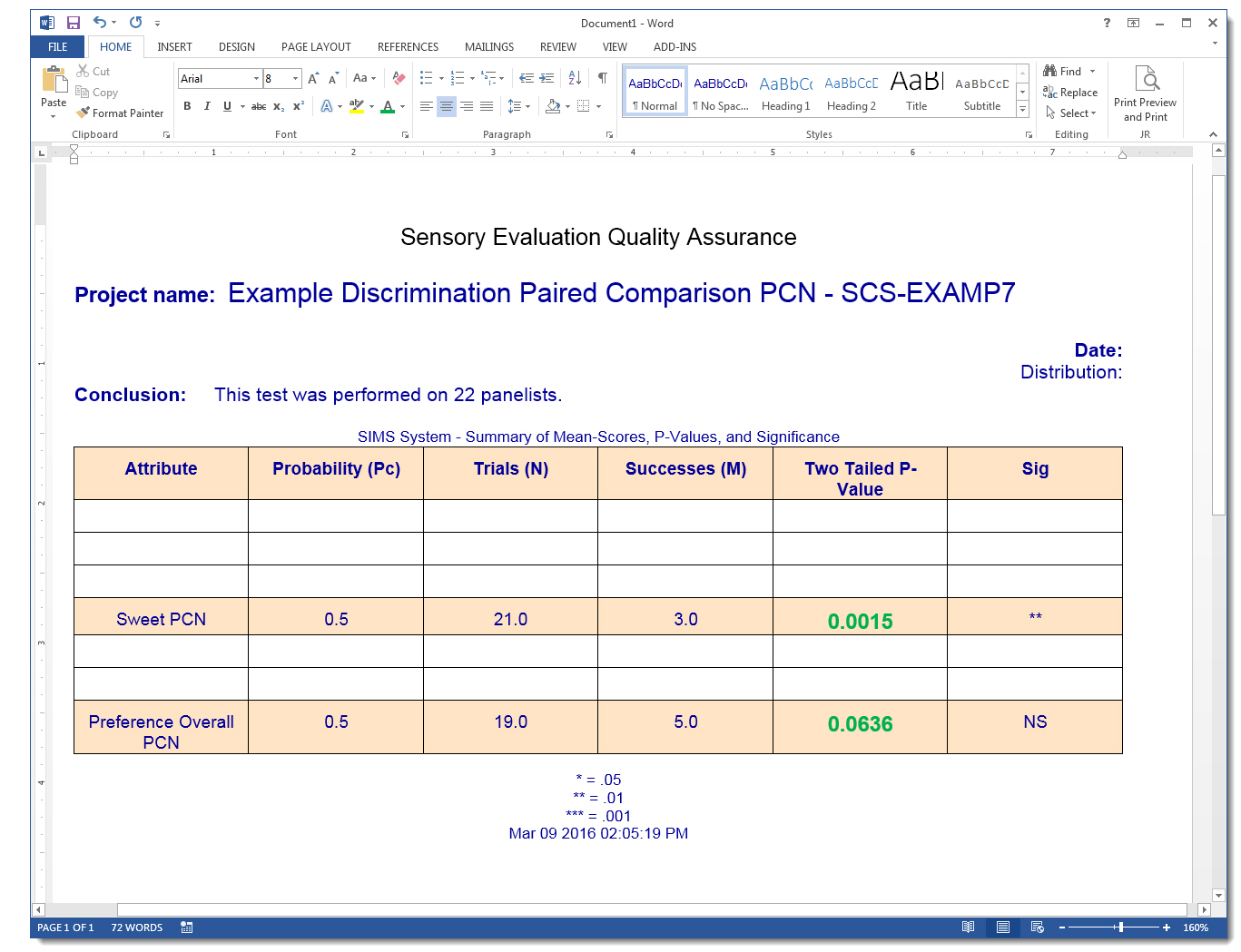
   ***   Discrimination Attributes  -  Notes   ***
   -----------------------------------------------

       Use Discrimination questions to test for the perception
          of small differences in sample stimuli.


       When the Technician is *Editing* the questionnaire, the BLINDING CODES shown 111, 222, etc
         are not the actual blinding codes that will be shown in your live test.  See your Test Definition Rotation Plan.


  Triangle
  ========
      Panelist is presented with three coded samples, two of which are identical.
      The panelist is asked to pick the sample which is different from the others.

        Example: Please evaluate all three samples, in order from left to right,
                 then select the one sample which is different from the other two.

      Result Data Values, the Value column for Discrimination Triangle Tests:  1=Correct  0=Incorrect

      Result Data Values, the Blinding Code column shows the actual Blinding Code selected by the panelist.
      Result Data Values, the Sample column shows the Absolute Sample Number of the FIRST(LeftMost) Sample presented as defined in the Rotation Plan Sample Set for this panelist.

      Discrimination triangles employ the standard triangle sample rotation plan AABB of 6 blocks:
             Block Number    Sample  Order 1  Order 2  Order 3
                   1                   1        2        1
                   2                   2        1        2
                   3                   1        1        2
                   4                   2        2        1
                   5                   1        2        2
                   6                   2        1        1


      Multiple Reps Discrimination:
        Use Affective ballot triangle when additional ballot functionality is needed beyond traditional Discrimination.
        Affective triangle studies also allow for flexible custom sample ordering experimental plans and multiple reps.


      Advanced: Automated Triangle Test Blinding Codes from Multiple Pulls.

                Rotated and *specific* sample multiple blinding codes.

                This differs from the SIMS standard options for 'Same Blinding Codes All Panelists.'
                    and 'Different Randomly Generated Blinding Codes All Panelists.'

                AABB 1 Pull, AA BB, utilize exactly *four* unique blinding codes.
                    Example file: SIMS_Software_Triangle_Blinding_Codes_AABB_from_AABB_1Pull.xls

                AAABBB 2 Pulls, AAA BBB, utilize exactly *six* unique blinding codes.
                    Example file: SIMS_Software_Triangle_Blinding_Codes_AABB_from_AAABBB_2Pulls.xls

                AAAABBBB 2 Pulls, AAAA BBBB, utilize exactly *eight* unique blinding codes.
                    Example file: SIMS_Software_Triangle_Blinding_Codes_AABB_from_AAAABBBB_2Pulls.xls

                AAAAAABBBBBB 3 Pulls, AAAAAA BBBBBB, utilize exactly *twelve* unique blinding codes.
                    Example file: SIMS_Software_Triangle_Blinding_Codes_AABB_from_AAAAAABBBBBB_3Pulls.xls

           Forum Topic: http://www.sensorycomputersystems.com/phpbb2/viewtopic.php?t=119


  Duo-Trio (Rotated or Constant)
  ==============================
      Panelist is presented with two coded samples and an identified reference sample.
      One of the coded samples will be identical to the reference sample.
      The panelist is asked to choose which of the two coded samples is different
      from (or identical to) the reference sample.

      There are two types of Duo-Trio sample presentations:

        Rotated - the reference sample is ROTATED between the the two test samples.

        Constant - the reference sample is always CONSTANT as the control sample.

        Example: Please evaluate the samples in order from left to right,
                 then select the sample which is the same as REF.

        Both DTR & DTC  Questionnaire 'Seen With' Relative Sample Order 1.    Two Choices ( ) 111  ( ) 222.
        Designs are 2C3.  Experimental Plans are DDTR (4 blocks  1 2 1  2 1 2  1 1 2  2 2 1) and DDTC (2 Blocks  1 2 1  1 1 2).

      Result Data Values, the Value column for Discrimination Duo-Trio Tests:  1=Correct  0=Incorrect

      Result Data Values, the Blinding Code column shows the actual Blinding Code selected by the panelist.
      Result Data Values, the Sample column shows the Absolute Sample Number of the FIRST(LeftMost) Sample presented as defined in the Rotation Plan Sample Set for this panelist.


  Paired Comparison
  =================
      Panelist is asked to compare two samples on the basis of some specifically
      defined criterion.  There are two types:

        Forced - The panelist must select one of the two samples.  (PC)

        Not Forced - The panelist can select 'Neither' to mean both samples are the same.  (PCN)
                        Optional:  See Choices Tab to select custom text for No Preference.

        Example: Please select the sample that is sweeter.

        Result Data Response Values for Discrimination Tests (PCN, PCF), the Absolute Sample Number SELECTED by the panelist.
          Most Reports in SIMS will report PCN PCF response data values as:
            1 = Absolute Sample 1 selected    2 = Absolute Sample 2 selected    . = No Preference
            Such as Test Data Results Report, Test Raw Data Excel Exporting, etc.

          For the editing raw test data area, and in the SQL database:
            Paired Comparison Data value '1' means Panelist selected Absolute Sample 1
            Paired Comparison Data value '0' means Panelist selected Absolute Sample 2
            If PCN & No Preference selected, response value is Null '.'


        Paired Comparison Reports:
          - See Statistics areas, Discrimination Binomial Analysis.
          - See Reports dropdown menu, Discrimination Reports, Paired Comparison Attribute Analysis.
          - See Reports dropdown menu, Raw Data Exporting.
          - And other reports.


        2-AFC (Alternative Forced Choice) is also known as a Paired Comparison Test.
          - Use This method to test for sensory differences between two samples, such as 'which sample is sweeter'.
          - set up your 2-AFC as a Paired Comparison test, with PC or PCN, where an answer is forced or not forced.
          - Same SIMS Paired Comparison Attribute Analysis, in addition to the other available reports.
          - Reference #1:  Sensory Evaluation Techniques, Civille, 3rd Ed.(pg 100), 2nd Ed.(pg 100).


        Incomplete Block Paired Comparisons
          Also commonly referred to as multiple paired comparison, multiple paired preference, pairwise ranking, and incomplete block paired preference.
          Can not use the typical Discrimination PC since a 2 sample, complete block design is required.
          Incomplete blocking such as 3C2, 4C2, 5C2, etc.,  when Samples >=3, and presenting only two samples.
          Two alternative methods:
            1) Ranking; Paired Comparison is similar to Pairwise Ranking.
                 Use an Affective type Questionnaire, SIMS Ranking Attribute question, 'rank all'.
            2) Hedonic; using SIMS hedonic attribute type, 'select one'.
                 Set up the ballot as an Affective questionnaire using Hedonic Attributes instead of the typical two sample Discrimination PC.
                 Affective questionnaire will allow for more flexible Incomplete Block Experimental Design and Experimental Plan Rotations.
                 Create an Hedonic attribute type with two choices and label the choices them with the following special TAGs.
                      <RELATIVE_SAMPLE_1_BLINDING_CODE>      select the choice return value to be = 1
                      <RELATIVE_SAMPLE_2_BLINDING_CODE>      select the choice return value to be = 2
                      The above example will present two choices with the blinding codes for the two samples in randomized order perfectly matching the Rotation Plan in the Test Definition.
                        Example: Which Sample do you prefer OVERALL?
                                                ( ) 135    (  ) 246
                 Note: The 'Attribute Seen With:' option should be set to 'Relative Sample -- Last Sample', so that this question is only seen once at the end of the ballot.

                 Note: See Webpage:    http://www.SIMS2000.com/Sample11.asp     for additional and the latest information.


  Positioning of Discrimination Attributes in Affective Questionnaires
  ====================================================================
       There are several guideline rules to follow when including a Discrimination
       Attribute in an Affective Questionnaire:

       1.  The Discrimination Attribute must be either 'Seen With Sample Order 1'
           or 'Seen With Sample Order 2.'  or  'Seen With Last Sample'.

       2.  If a Discrimination Attribute is Seen With Sample Order n, then
           all discrimination attributes in the same questionnaire must also
           be Seen With Sample Order n, where n = 1 or n = 2  or  'Seen With Last Sample'.

       3.  All attributes seen on the same page as a Discrimination Attribute
           must be seen with same sample as the Discrimination Attribute.

       4.  You can include any attribute type except 'Time Intensity' on the
           same page as a Discrimination Attribute.


  Same/Different Tests in SIMS    Chi-Square Analysis
  ===================================================
    The Same/Different Test is also commonly referred to as the Simple Difference
    Test. The Same/Different Test method is sometimes used when your two samples
    are unsuitable for triple or multiple test presentations, e.g. when the
    Triangle and Duo-trio tests can not be used.

    Although SIMS does not have a specifically named Same/Different
    Test option, it is fairly easy to set up.

    On its web site Sensory Computer Systems has posted an EXCEL file which
    describes how to set up a Same/Different Test in SIMS .
       Website Forum Link: http://www.sensorycomputersystems.com/phpbb2/viewtopic.php?t=60

      The Excel File is organized in three simple worksheet tabs.
        1. TestPreparationNotes, how to quickly setup the test in SIMS .
        2. SIMSTestData, how to get your Same/Different data to Excel.
        3. Chi-SquareAnalysis, the statistics.
      The Excel File is located in the online forum area at www.SIMS2000.com,
        Click on Support, Forums, and Search for 'Same' and 'Difference'

      Advanced note: Fisher's Exact Test (FET) statistical test of the equality of two independent binomial proportions.
        - Discussed in ASTM E2139-05 Standard Test Method for Same-Different Test
        - Online Calculators: http://www.graphpad.com/quickcalcs/contingency1.cfm and http://www.langsrud.com/fisher.htm
        - More notes and formulas: http://en.wikipedia.org/wiki/Fishers_exact_test and http://faculty.vassar.edu/lowry/fisher.html
        - Formula excel example: http://udel.edu/~mcdonald/statfishers.html
        - FET vs chi-Square, chi-square calculates aproximation P-value and it more suited to tests where the # of assessors is not sparse, i.e. where all cells expected frequency values is >=5. In many cases the Chi-square is preferred because the Fisher Exact Test is difficult to calculate.
        - As of this writing SIMS does not automatically calculate FET, please use one of the online calculators, and use our chi-square.xls to get to the 4 cells needed; Matched and Unmatched pairs, and the responses Same and Different.


    It's easy.
       Time needed to setup test in SIMS = 5 minutes.
       Time needed to export data into Excel Spreadsheet = 3 minutes.
       Time needed to get to final Chi-Square statistics = 1 minute.


  A - Not A Tests in SIMS    Chi-Square Analysis
  ==============================================
    The A - Not A Test method is used to determine whether a sensory difference
    exists between two products.  It is sometimes used when your two samples are
    unsuitable for triple or multiple test presentations, e.g. when the Triangle
    and Duo-trio tests can not be used.

    Although SIMS does not have a specifically named A - Not A
    Test option, it is fairly easy to set up.

    On its web site Sensory Computer Systems has posted an EXCEL file which
    describes how to set up a A - Not A Test in SIMS .

      The Excel File is organized in two simple worksheet tabs.
        1. TestPreparationNotes, how to quickly setup the test in SIMS .
        2. Chi-SquareAnalysis, the statistics.
      The Excel File is located in the online forum area at http://www.sensorycomputersystems.com/phpbb2/viewtopic.php?t=65

    Click on Support, Forums, and Search for 'Chi-Square'

    It's easy.
       Time needed to setup test in SIMS = 5 minutes.
       Time needed to export data into Excel Spreadsheet = 3 minutes.
       Time needed to get to final Chi-Square statistics = 1 minute.


  Difference-From-Control Test
  ============================
    Use this test when the project objectives include the following:

          O      Determine whether there is a difference between a control (reference) sample
                 and one or more other samples.
          O      Estimate the degree of such difference(s).

    Although SIMS does not have a specifically named Difference-From-Control test,
    it is fairly easy to set up.

    On its web site Sensory Computer Systems has posted a detailed forum document on how to
    set up this type of test.  It is located at http://www.SIMS2000.com/sample12.asp

    Click on Support, then Forums. Search for 'Difference' and 'Control.'


  TETRAD TESTING NOTES
  --------------------

    Tetrad Test is a discrimination test presenting 4 products to the judge among which 2 are from one group and 2 are from another group. 2A 2B.
    AABB BBAA ABAB BABA ABBA BAAB, 6 possible presentations, same as Triangle Test.
    Guess probability is 33%, same as Triangle Test.  For the unspecified tetrad test.

      Unspecified tetrad test vs specified tetrad test.  More common type of tetrad test is the unspecified tetrad test.
        Unspecified tetrad test:
          Acccessors are not given any specific instructions about attributes to focus on.
          Acccessors task is simply to group the products with out regard for order or intensity.
          Guess probability is 33%, same as Triangle Test.
          SIMS Reports assume the unspecifed tetrad test.
        Specified tetrad test:
          Acccessors are given a specific attribute to focus on.
          Acccessors task is to group the products in the correct intensity order, usually low to high, week to strong, etc.
          Guess probability is 17%.  Adjust Excel line for 'Probability of a Correct Guess:', and recount correct/incorrect.


    Tetrad Test Setup:
    ------------------
      See examples on SIMS Webpage:  http://www.SIMS2000.com/Questionnaire-Tetrad.asp
        SIMS Software Express Package file examples are available on the webpage for quick Set up on your SIMS System.

      Your Affective SIMS Ballot must include:
        1 Instruction Box for the Group A and Group B Column headings, use <WEBTEXTGRID; Tag for this, copy from examples.
        4 Hedonics, 2 choices each, return values 1 and 2 referring to Group A and Group B.
        Each of the 4 Hedonic export labels  = "Relative Sample Order #" , where # is 1 to 4.
        Each of the 4 Hedonic questions text = "Sample <RELATIVE_SAMPLE_#_BLINDING_CODE> " , where # is 1 to 4.

        ONLY ONE TETRAD GROUP OF 4 CAN BE BUILT INTO THE BALLOT AT A TIME.
          If you need multiple Tetrad groups then please use separate SIMS tests and use Test Linking for the panelist session.
          Reps, multiple Reps are supported.

      During your test, SIMS will be able to identify and detect the Tetrad Test page and validate the 2 x 2 responses for Group A & Group B.


    Tetrad special ballot detection criteria for Reports:
      In order to properly identify Tetrad Ballots and Tests,
      SIMS looks for ballots with exactly 4 Hedonics where Attribute Seen With = Relative Last Sample, and the Export Label contains word 'Relative'
      These guidelines are needed to best handle the new complexity of Tetrad designs and may be adjusted in the future.


    Tetrad Reports:
    ---------------
      Stats, same as Triangle Test.
        See complete statistical Table 17.8 Critical Number of Correct Responses in Triangle Test,
        Sensory Evaluation Techniques, 4th Edition, by Meilgaard, Civille, and Carr, page 433.

      Best SIMS Tetrad Report is located at:  SIMS Main Menu | Reports | Discrimination Reports | Discrimination Correct/Incorrect Report - Tetrad

         Tetrad Report's Panelist Details lines show 'Correct' or 'Incorrect' for each individual panelist.
         Tetrad Report's S1 S2 S1 S2 = Group #s are shown in the same order required for the Excel Output layout calculations, S1 S2 S1 S2.
         This order is not necessarily the same as the Test Rotation Plan presentation order.

      Most other SIMS reports will not provide meaningful information for your Tetrad.
      The Tetrad Report will show Correct/Incorrect for each participant along with their Group A or Group B responses.
      In rare cases the response column may show n/a (not available) indicates that the panelists didn't answer or is still pending the Tetrad page,
        and if the report shows n/a and responses for all 4 samples, indicates that the responses are not 2X2 Group A & Group B, which should not happen.

      SIMS Reports assume the unspecifed tetrad test.


    Where's my Tetrad Test?:
      Likely your ballot didn't match the detection criteria discussed above.  Contact the Sensory Computer Systems support staff and they'll assist.


    Tetrad Experimental Design:
      Because this test is a little different than a typical discrimination test, the experimental design will also be a little different in setup.
      Two samples, four are presented.  Setup a 2C4R1 experimental design, with an experimental plan t=2, k=2, b=6, r=1 , where the 6 blocks are: 1) 1122 2) 2211 3) 1212 4) 2121 5) 1221 6) 2112.


    Tetrad Test Definition:
      Review your Test Rotation plan for accuracy.


    References:

      IFT Webinar - Tetrad Testing- How & Why - Sensory and Consumer Sciences Division | Tom Carr | March 2015
      https://www.pathlms.com/ift-learn-online/events/275/video_presentations/10871

      ASTM Standard E3009-15, developed by Committee E18.04, new standard as of June 2015.
      E3009 - Standard Test Method for Sensory Analysis-Tetrad Test
      http://www.astm.org/Standards/E3009.htm

      ASTM WK WK32980 New Test Methods for Sensory Analysis-Tetrad Test, Tom Carr 2015

      GUIDING THE SWITCH FROM TRIANGLE TESTING TO TETRAD TESTING      Author: JOHN M. ENNIS, The Institute for Perception, Virgina USA, Published Journal of Sensory Studies June 2012
      A LARGE-SCALE EXPERIMENTAL COMPARISON OF THE TETRAD AND TRIANGLE TESTS IN CHILDREN      Authors: KAREN GARCIA, JOHN M. ENNIS and WITOON RINYAWIWATKUL, Published Journal of Sensory Studies Aug 2012
|
